Analytical balances are essential instruments in laboratory settings. They are highly sensitive and precise measuring tools that can measure weights up to four decimal places. Analytical balances are commonly used in pharmaceutical, chemical, and biotech laboratories to measure small quantities of chemicals, compounds, and reagents. In this article, we will discuss how to use analytical balances in laboratory settings.
Understanding Analytical Balances
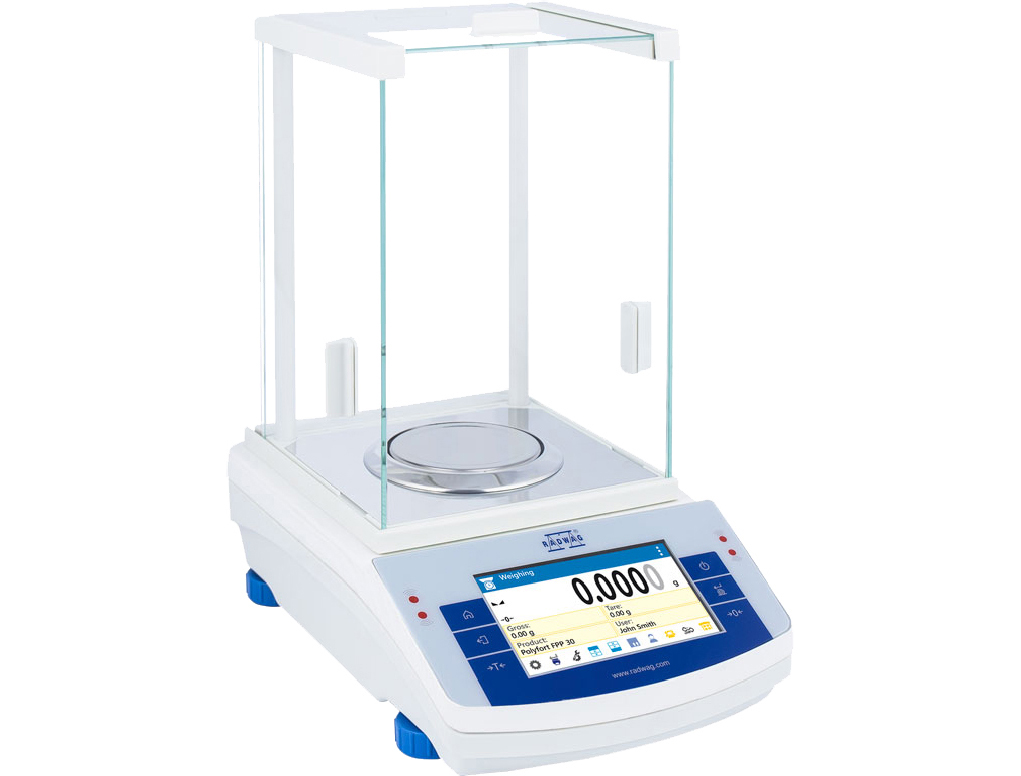
Analytical balances are designed to measure small masses with high accuracy and precision. They typically have a readability of 0.1 milligrams, which means they can measure weight up to four decimal places. Analytical balances are enclosed in a glass chamber to protect them from air currents, dust, and other environmental factors that could affect their accuracy.
Parts of an Analytical Balance
Analytical balances consist of several components that include:
- Weighing pan
- Weighing chamber
- Draft shield
- Calibration weights
- Display
Calibration of Analytical Balances
Before using, it must be calibrated. Calibration is a process of adjusting the balance to ensure it is measuring accurately. Calibration weights are used to calibrate the balance. The weights should be selected based on the balance's readability. For example, if the balance has a readability of 0.1 milligrams, the calibration weight should also be 0.1 milligrams.
Preparation for Weighing
To obtain accurate measurements, several steps must be taken before weighing. These include:
- Turn on the balance and allow it to warm up for 30 minutes to an hour.
- Close the doors of the weighing chamber to protect the balance from air currents and dust.
- Calibrate the balance using appropriate weights.
- Level the balance by adjusting the leveling feet.
- Tare the balance to zero by pressing the tare button.
- Wait for the balance to stabilize before placing the sample.
Weighing the Sample
After the laboratory balance has been calibrated and prepared for weighing, the sample can be weighed. To obtain accurate measurements, follow these steps:
- Open the doors of the weighing chamber.
- Place the sample on the center of the weighing pan.
- Close the doors of the weighing chamber.
- Wait for the balance to stabilize before taking the reading.
- Record the weight.
Precautions When Using Analytical Balances
Analytical balances are sensitive instruments that require careful handling. The following precautions should be taken when using analytical balances:
- Avoid touching the weighing pan or other parts of the balance with your hands.
- Do not breathe directly on the balance.
- Use clean, dry weighing paper or other appropriate containers for weighing samples.
- Do not exceed the maximum capacity of the balance.
- Do not place the balance near sources of vibration or air currents.