6242
  • LOGIN
  • Hebrew 
MRCLAB-Laboratory Instrumentsעברית
    • laboratory equipment
    • Laboratory Balances
    • Measuring Instruments
    • material testing
    1. home page
    2. laboratory equipment
    3. Microscopes
    4. Cameras Microscope

    Cameras Microscope

    MRC introduces microscope cameras. The camera can be installed on the microscopes to get clearer images. The pictures can be seen through the computer. Combining a camera under a microscope makes the microscope digital and provides accurate observation.They are suitable for use in the home, schools, laboratories, industry and highly advanced applications.
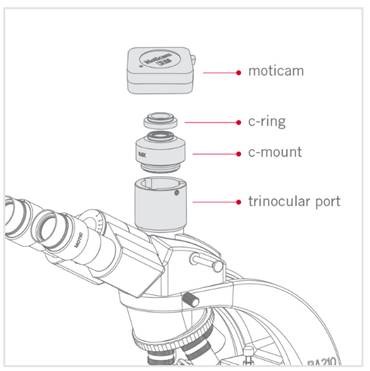
    Connecting a camera to a microscope is suitable for a TRINOCULAR microscope with 3 eyepieces(TRINOCULAR,  with 3 eyepieces,2 for the eyes and one for connection to the camera)
    Image for illustration:
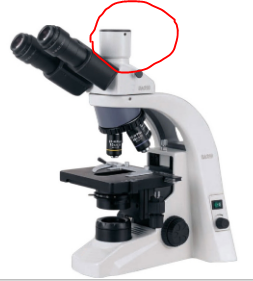
    microscope cameras

    An adapter is needed to connect the camera to the tyronocular model. The adapters we provide are of the C-MOUNT type, for example it looks like this
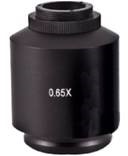
    microscope cameras

    Image for illustration of microscope cameras:
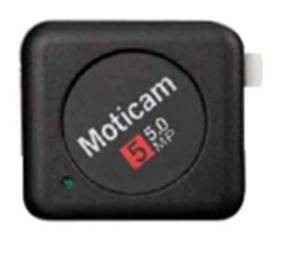
    microscope cameras

    microscope cameras


    Primary Manufacturer:

    Motic 

    Motic is a huge manufacturer of MICROSCOPES and MICROSCOPES accessories.
    Motic -since 1988.
    Motic is one of the first microscope manufacturers who started to develop digital microscopy solutions, digital imaging products and application software

    MORE ABOUT Cameras MicroscopeCLOSE
    60812
    • Your Choice:
    products
    filter:
      MICROSCOPE CAMERA
      MOTICAM-S1

      Microscope camera 1280x960 pixels

      1
      microscope camera 2048x1536 pixels
      MOTICAM-S3

      Microscope camera 2048x1536 pixels

      1
      microscope camera 3072x2048 pixels
      MOTICAM-S6

      Microscope camera 3072x2048 pixels

      1
      microscope camera 4000x3000 pixels
      MOTICAM-S12

      Microscope camera 4000x3000 pixels

      1
      microscope camera 2448x2048 pixels
      MOTICAM-PRO-S5-LITE

      Microscope camera 2448x2048 pixels

      1
      MOTICAM-PRO-S5-PLUS

      Microscope camera 2448x2048 pixels

      1
      Tablet digital camera for microscopes, 5 MP
      MOTICAM-BTU10

      Tablet digital camera for microscopes, 5 MP

      1
      Moticam4000X

      8Mega Pixel standalone microscope camera with HDMI, UVC, WiFi multiple outputs

      1
      Moticam-4000XBMH

      Microscope camera 1080p Full HD+ integrated LCD screen

      1
      High resolution streaming Wi-Fi 2MP camera
      MOTICAM-X

      High resolution streaming Wi-Fi 2MP camera

      1
      MOTICAM V1300

      Integrated screen microscopy camera

      1
      blogs

      BLOGS

      ABOUT US

      ABOUT US

      CONTACT US

      CONTACT US

      SERVICE CENTER

      SERVICE CENTER

      • ABOUT
      • |
      • PRODUCTS
      • |
      • CATALOGS
      • |
      • SUPPORT
      • |
      • SERVICE CENTER
      • |
      • CUSTOMERS
      • |
      • TERMS
      • |
      • Privacy Policy
      • |
      • FAQ
      • |
      • BLOGS

      [email protected], + 972-3-5595252
      ISRAEL: Hagavish 3 Holon
      UK: Cavendish House Parkway, Harlow Business Park, Harlow, CM19 5QF

      • Bsmart בניית אתרים
      • SAP
      altImg

      • Fully Supported on Chromee*
      • Color Blind Adjusted
      • Heavy Vision Adjusted
      • Regular Display
      • Access Keys MenuAlt + 0
      • Stop Motion
      • Remove Underline Links
      • Press Keys For View Resize
      • Ctrl + Larger
      • Ctrl - Smaller
      • Ctrl 0 Reset Size
      • Enable Disable Keyboard Focusing
      • Reset All To Defualt

      Access Keys

      • Enable/Disable This MenuAlt + 0
      • Skip To Main MenuAlt + 1
      • Skip To Main ContentAlt + 2
      • דלג למפת אתר מונגשת Alt + Shift + 3
      • SearchAlt + 4
      • Contact PageAlt + 7
      • דלג למפת העמוד Alt+5
      • Skip To HomepageAlt + h
      • Skip To Accessibilty MenuAlt + m

      *Firefox users: Use Alt + Shiftnumber

      In order to move between elements, Press - Tabkey, To backtrack press, - Shift + Tab

    • Skip To Main Menu
    • Skip To Main Content
    • Skip To Accessbilty Menu
    • This website uses cookies for the purpose of ongoing and proper operation in accordance with the privacy policy